
Instead of manually copying move-out details into cleaning enquiries, connect Rex Software to bond clean bookings through an approved request-and-confirm workflow. Start with a verified source record, send only authorised cleaning details, and mark the job booked only after the cleaner confirms it.
- Connect Rex Software to bond clean bookings through a verified handoff, not an assumed native integration.
- Sparkleclean provides bond cleaning for residential tenants; confirm the cleaning scope before sending a request.
- Keep requested dates separate from confirmed bookings, and match updates to the existing request.
- Test new requests, changed dates and cancellations before enabling external messages.
Why this matters
A move-out date is not a cleaning instruction. You also need the tenant's authority, the agreed scope, a suitable cleaning date and an access arrangement. Automating an incomplete record simply sends the problem to someone else faster.
Sparkleclean bond cleaning is best for residential tenants seeking professional end-of-lease cleaning. The service addresses the physical clean; your workflow must handle the booking instructions and confirmation. Start with Sparkleclean when choosing the service, then agree how requests will be received before connecting systems.
For your 2026 setup, separate administrative automation from booking acceptance. A successfully delivered message proves delivery to a destination, not acceptance of a cleaning job. Neither a workflow nor a cleaning booking guarantees a bond refund.
Before you start
- Source access: Have an authorised Rex administrator identify the exact Rex product, the record containing the move-out information and a supported way to retrieve it. Confirm that the required dates actually exist in Rex. If another system owns those dates, use that system as the source instead.
- Destination agreement: Choose a workflow platform or an agency-managed process, nominate an owner and agree a request channel with the cleaner. Obtain authority to share the tenant's contact details and instructions. Keep credentials out of property notes and outgoing messages.
- Critical gotcha: Do not assume a Rex record update means a tenancy has ended. A general contact or property edit must not create a cleaning request. Identify an explicit approval condition before building the trigger, and confirm the destination can accept your proposed handoff.
Treat this as a configuration specification, not a Rex menu walkthrough. Use the controls documented for your actual account and connection method. The field names below are proposed workflow labels, not claimed Rex screen labels, buttons or built-in features.
Source record and request trigger
Choose the handoff method
Choose the least complex method that your administrator and cleaner can support. Do not select a connection merely because its name resembles your Rex product.
| Handoff method | Best for | Benefit | Limitation |
|---|---|---|---|
| Approved integration or API route | Teams with verified access and technical ownership | Structured transfer and controlled update handling | Requires confirmed source access and destination support |
| Approved email handoff | Teams whose source process can generate a consistent, authorised message | A readable request that a coordinator can review | Message delivery does not confirm a booking |
| Coordinator-reviewed request register | Teams without a verified automated connection | Keeps approval and exception handling visible | Still requires a person to transfer or approve details |
For Sparkleclean bond cleaning, agree the receiving process directly rather than treating the service as a software endpoint. A service booking and a technical connection are separate arrangements.
Configure the eligibility rules
- Identify the record that represents the specific move-out event. Record its stable identifier in your request register. An address alone is insufficient because the same property can have separate tenancies.
- Define a deliberate approval condition, using the proposed label Cleaning request approved. Only the authorised coordinator should apply that approval after checking the tenant's instructions.
- Require the property address, requested cleaning date, authorised contact, cleaning scope and access plan before the record can proceed. Route incomplete records to review rather than supplying guessed values.
- Select a supported retrieval method with your administrator. If the source cannot expose the relevant event or data, retain a coordinator-reviewed handoff; do not automate from unrelated property activity.
- Set the first live boundary for the 2026 rollout. Process newly approved requests after that boundary rather than sending historical records automatically.
Expected result: An approved move-out event creates a draft request. Unrelated edits and incomplete records create no outgoing cleaning instruction.
Cleaning request and field mapping
Build the request record
- Create a separate request register in your chosen workflow environment. Store the source reference, request reference, processing status and responsible coordinator together.
- Map source values into the proposed fields below. Where a value has no reliable source, require coordinator input instead of inventing a default.
- Separate the requested cleaning date from the date the cleaner accepts. Preserve both values so a scheduling change does not erase what the tenant originally requested.
- Validate the property address, including the unit identifier. Keep building entry instructions separate from the street address so they are visible during coordination.
- Include only the information needed to arrange and carry out the clean. Exclude unrelated tenancy documents, identity records and private commentary.
| Proposed workflow field | What it contains | Validation rule |
|---|---|---|
| Source reference | Identifier for the move-out event | Present and stable across edits |
| Requested clean date | Tenant-approved preferred date | Explicit date, separate from lease end |
| Property address | Unit, street, suburb and postcode | Complete enough to identify the property |
| Cleaning scope | Agreed rooms and requested services | No assumed inclusions |
| Access plan | Authorised entry arrangement and contact | Reviewed before dispatch |
| Booking status | Current request or booking state | Changes only after the relevant action |
| Cleaner reference | Reference returned with acceptance | Added when supplied by the cleaner |
Expected result: A coordinator can read the request without opening unrelated records, and every required instruction has a clear source.
Confirm the physical cleaning scope
Use the bond cleaning checklist for apartments in Australia to structure the scope discussion. Record carpet steam cleaning, oven deep cleaning and window cleaning explicitly when requested; do not infer that every service belongs in every clean.
Also record whether furniture will remain and when removalists finish. Cleaning instructions must describe the property the cleaner will actually enter, not its expected condition when the request was first drafted.
As a 2026 acceptance check, ask the coordinator to read the outgoing request without viewing the source record. If the coordinator cannot identify the property, scope, requested date and access contact, return it for completion.
Booking confirmation and duplicate control
Configure the request lifecycle
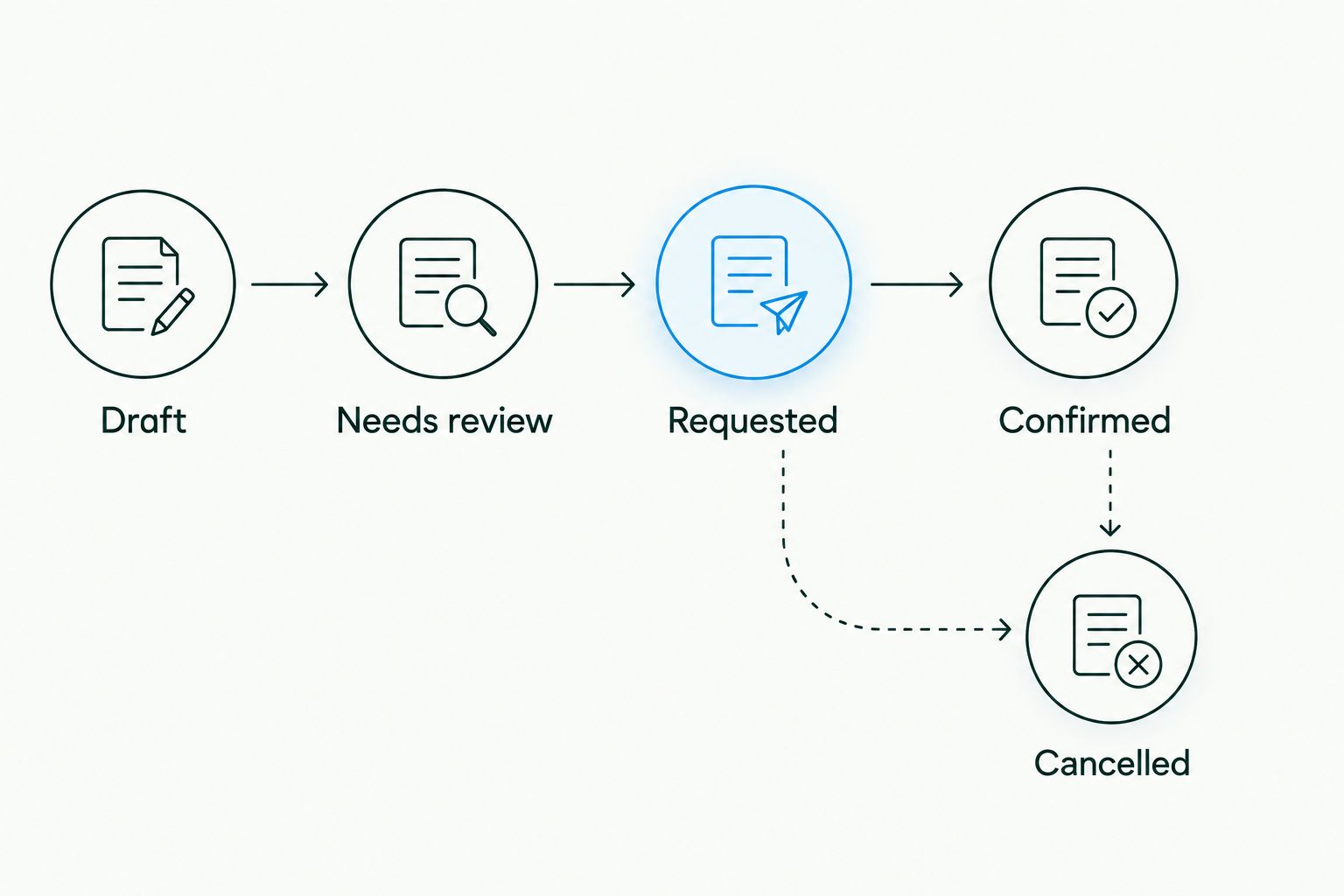
- Define the proposed statuses Draft, Needs review, Requested, Confirmed and Cancelled. These belong to your workflow specification; use equivalent supported controls in the system you select.
- Set Requested only after the approved request has been sent through the agreed channel. Record the send outcome and retain the request reference.
- Set Confirmed only after explicit acceptance from the cleaner. Store the accepted date, agreed scope and cleaner reference when supplied. Do not use a delivery receipt as acceptance.
- Match each repeat event against the existing source reference before creating anything new. Design for a maximum of 1 active request per move-out event; route deliberate replacements through review.
- Assign failed sends and unanswered requests to a named coordinator. Keep the tenant-facing message factual: requested and confirmed are different states.
Expected result: Everyone can distinguish a draft, an enquiry and an accepted booking. Reprocessing the same source event updates or flags the existing request rather than creating another instruction.
The sequence should stay visible throughout your 2026 rollout. Use the same status meanings in the request register, coordinator notes and tenant messages.
Test before external dispatch
Keep external dispatch disabled while checking the workflow logic. Use fictional contact details and clearly marked internal test records rather than real tenant information.
- Prepare 3 test records: an approved request, an incomplete request and a duplicate of the approved event. Expect the incomplete record to stop and the duplicate to match the existing request.
- Re-run the approved event. Confirm that its request reference stays unchanged and no additional draft is created.
- Change the requested date and then cancel the test event. Check that both actions reach review rather than silently producing a fresh booking.
- Require 0 external messages during this internal test. Review the rendered request, access details and status history before authorising a controlled live handoff.
Expected result: The workflow passes its request, validation, duplicate and change checks without contacting a tenant or cleaner during the internal test.
Update the request whenever move-out details change
A second useful workflow handles changes after the initial request. Use it to manage revised dates, altered scope and cancelled moves without starting the booking process again.
- Compare the incoming record with the last approved version. Watch only the fields that affect cleaning, such as the requested date, property, scope, access plan and authorised contact.
- Find the existing request using its source reference. If no match exists, send the event to review rather than assuming it needs a new booking.
- Before confirmation, revise the draft or send a clearly identified amendment through the agreed channel. After confirmation, request a change and preserve the accepted booking details until the cleaner responds.
- For cancellation, stop pending workflow actions and notify the coordinator. Record the cleaner's acknowledgement separately from the tenant's cancellation instruction.
Expected result: A changed source record creates a traceable amendment. It does not erase the accepted booking or imply that the cleaner has accepted a different date.
Keep a readable change history for the 2026 operating process. The coordinator should be able to identify what changed, who authorised it and whether the cleaner acknowledged it.
Troubleshooting
No request appears after an update
Check whether the event meets the approval rule and whether every required field is populated. Then inspect the source connection and processing history with your administrator. Do not broaden the trigger to every property edit as a shortcut.
The same clean appears twice
Check whether duplicate detection uses the move-out event reference rather than the address or tenant name. Review the send history before removing anything: duplicate register entries and duplicate instructions sent to a cleaner need different corrections.
The cleaning date is wrong
Check whether the mapping copied the lease end date into the requested cleaning date. Review date formatting and the property's local time zone wherever a timestamp is involved, then obtain approval before sending a corrected instruction.
The register says confirmed, but nobody accepted
Remove any rule that treats message delivery or successful processing as booking acceptance. Restore the request to review, contact the coordinator and obtain explicit confirmation before telling the tenant the booking is arranged.
A cancelled request still generates messages
Check each pending action against the current request status before dispatch. Stop obsolete queued actions and reconcile the cancellation with the coordinator; changing a register entry alone does not withdraw an instruction already sent.
Customise your workflow
Once the basic handoff works, extend the process around the clean rather than adding more triggers. Assign someone to check removalist completion, building access, inspection timing and the cleaning receipt.
Keep tenant approval visible when a property manager coordinates the request. Automation should carry an agreed instruction, not decide on the tenant's behalf who performs the clean or what work is required.
For Sparkleclean, retain separate scope entries for bond cleaning and any requested carpet, oven or window work. The benefit is a clearer handoff; the limitation is that every scope change still needs agreement rather than silent automation.
FAQ
Can I connect Rex Software to bond clean bookings automatically?
Build an automatic handoff only after verifying a supported source connection and an agreed receiving process. Keep booking confirmation separate from request delivery.
Does Rex Software have a native Sparkleclean integration?
Do not assume a native integration exists. Confirm the exact Rex product and connection method with your administrator, and agree the receiving process with Sparkleclean before setup.
What should trigger a bond cleaning request?
Use an explicit, authorised cleaning approval attached to the relevant move-out event. A general contact update, property edit or lease end date alone is not a complete cleaning instruction.
Can a changed move-out date reschedule the cleaner automatically?
A changed move-out date should create an amendment for the existing request. Preserve the confirmed booking until the cleaner accepts the proposed change.
How do I stop duplicate bond clean requests?
Match incoming events against a stable move-out reference before creating a request. Repeated processing should find the existing request rather than send another instruction.
What happens if my Rex account does not contain move-out dates?
Use the system or approved process that actually holds the move-out information as your source. Do not substitute an unrelated Rex property date just to make the workflow run.
Does an automated booking guarantee my bond refund?
No. An automated booking coordinates cleaning instructions; it does not determine the outcome of a bond assessment. Keep the agreed scope, confirmation and cleaning records together.
One last thing
A successful automation run can still leave you with no booking. The technical process ends when a request reaches its destination; the booking process ends when the cleaner accepts it.
Before enabling your workflow, ask someone outside the setup team to find the accepted date and confirmation evidence from the request register alone. If they cannot, fix the status design before adding further automation. That check is more useful than another notification.
Related guides
- Schedule end-of-lease cleaning around your inspection date
- Organise end-of-lease cleaning around a removalist
- Get a cleaning receipt for your real estate agent
SparkleClean's end-of-lease service comes with a 72-hour re-clean guarantee. Get an instant price — no hidden fees, book in under 3 minutes.