
Instead of manually copying departure dates into cleaner messages, connect Smoobu to Airbnb turnover cleaning through a reservation-to-job workflow that creates, updates and cancels cleaning tasks. Use a supported cleaning connector or a custom API connection, then require cleaner acceptance before treating a turnover as covered.
- Connect Smoobu to Airbnb turnover cleaning with reservation-based tasks, not departure-date messages alone.
- Use stable reservation identifiers to prevent duplicate cleaning jobs when bookings change.
- Test cancellations, extended stays and same-day changeovers before enabling automatic dispatch.
- Sparkle provides bond cleaning for departing residential tenants; keep that scope separate from recurring guest turnovers.
Why this matters
A booking appearing in a calendar does not mean a cleaner has accepted the job. Your workflow needs to track the reservation, the cleaning assignment and completion separately. Otherwise, a successful data transfer can hide an uncovered departure.
This 2026 guide covers the workflow rules and acceptance tests for connecting Smoobu reservations to a cleaning task system. The destination must support the actions you need; importing dates alone is not enough.
Keep the service scope clear, too. Sparkle bond cleaning is best for residential tenants preparing to leave a rental. A recurring Airbnb turnover needs an agreed guest-ready checklist, linen arrangements and dispatch process; do not assume an end-of-lease cleaning service includes those responsibilities.
Before you start
- Accounts and permissions: Have access to the Smoobu account managing the property, its connected Airbnb listing and your chosen cleaning task system. For a custom connection, arrange authorised API access and someone responsible for maintaining it.
- Property and cleaner details: Prepare a property identifier, local time zone, checkout time, next check-in deadline, cleaning checklist and assigned contact. Agree how the cleaner accepts work and reports completion.
- The gotcha: A blocked calendar period is not necessarily a guest reservation. Exclude owner stays, maintenance blocks and other non-guest entries unless you deliberately want them to create cleaning tasks.
Before configuring anything, ask the destination provider to demonstrate reservation creation, amendments and cancellations using Smoobu data. Check whether the connection carries stable reservation identifiers and booking status, rather than only a title and dates.
For your 2026 setup record, note the connection method, permission owner and person receiving failure alerts. Keep credentials out of cleaner messages and shared property checklists.
Connection method
Choose the connection according to the booking changes it can handle. Do not choose solely because an initial reservation appears successfully.
| Connection method | Best for | Advantage | Limitation to check |
|---|---|---|---|
| Supported cleaning connector | Hosts wanting a maintained connection | Uses the connector's existing reservation-to-task process | Confirm support for amendments, cancellations and cleaner acceptance |
| Custom API workflow | Operators needing their own dispatch rules | Lets you define task matching, exceptions and alerts | Requires development, secure credentials and ongoing maintenance |
| Calendar subscription | Sharing a basic occupancy view | Gives a cleaner visibility of scheduled stays | Do not assume it supplies booking status, immediate updates or job acceptance |
Use a supported connector only after it passes your change-handling tests. Use a custom API workflow when your required rules cannot be configured in that connector. Keep calendar subscriptions as a visibility aid unless the receiving system demonstrates the full cleaning workflow.
For a calendar-based starting point, see the guide to syncing an Airbnb calendar to turnover cleaning. The distinction remains the same: viewing a departure and assigning a clean are separate actions.
Reservation source
The first configuration unit establishes which reservations are allowed to create cleaning work. Start with 1 property so you can trace every result before expanding.
- Verify the Airbnb connection. Compare an existing confirmed Airbnb booking with its Smoobu reservation. Check the property, arrival date and departure date before connecting the cleaning destination.
- Authorise the destination. Use the selected provider's documented Smoobu connection process, or have your developer configure authorised API access. Follow that provider's actual interface labels; these differ between connectors.
- Restrict the initial scope. Select the test property and accept only the reservation types and statuses you intend to service. Route uncertain records for review instead of dispatching them.
- Capture the reservation identifier. Store the source reservation ID alongside the property identifier. Do not use the guest's name, email address or departure date as the task's identity.
- Record changes. Retain the latest relevant reservation details so the workflow can distinguish a new booking from an amendment to an existing booking.
Expected result: The test reservation reaches the destination with its source identifier, correct property and current dates. Processing the same reservation again still identifies the same booking.
If the destination cannot preserve an identifier that remains stable when dates change, resolve that before proceeding. Otherwise, an extended stay can become an additional cleaning job instead of a changed one.
Cleaning job rules
The second configuration unit converts a reservation into a practical cleaning assignment. Define these fields in your task system or custom workflow; they are your operating record, not Smoobu menu labels.
- Create a property mapping. Match the source property identifier to the cleaning address, checklist and assigned cleaner. Reject unmapped properties rather than sending an incomplete task.
- Set the cleaning window. Use the departing reservation's checkout date and your agreed checkout time for the earliest start. Set the deadline from the next guest's check-in requirements, not from an assumed universal turnover duration.
- Set the local time zone. Apply the property's time zone when constructing appointment times. Check daylight saving behaviour for properties in locations that observe it.
- Match before creating. Search the task register using the source reservation identifier and property identifier. Update an existing turnover task; create one only when no matching task exists.
- Separate dispatch states. Track whether the task is awaiting assignment, accepted, in progress or completed. Choose your own clear status labels and document what each means.
- Limit shared information. Give the cleaner the address, cleaning window, checklist and relevant access instructions. Keep unrelated guest contact details out of routine task messages.
Expected result: The reservation creates 1 cleaning job with the correct property, start constraint, deadline and acceptance requirement. Reprocessing the reservation updates that job without adding another.
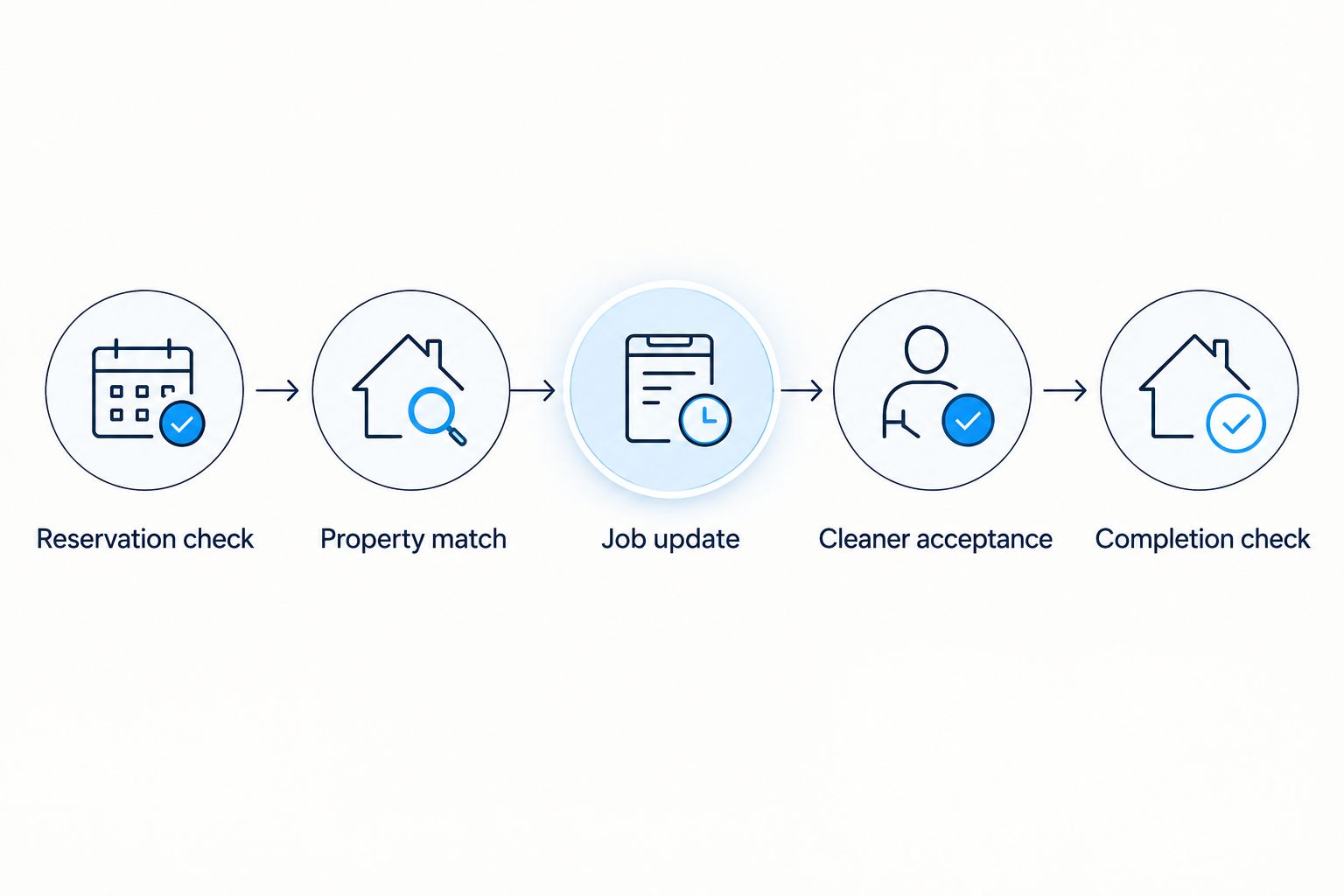
Use the following sequence as the minimum operating path. Each stage needs a visible result before the next stage counts as complete.
- Reservation check: Confirm the booking belongs in the cleaning workflow.
- Property match: Attach the correct address and checklist.
- Job update: Create or amend the matching turnover task.
- Cleaner acceptance: Record that someone has taken responsibility.
- Completion check: Confirm the property is ready against the agreed checklist.
Dispatch and acceptance tests
The third configuration unit proves the workflow before it sends unsupervised instructions. Keep dispatch under review during these tests and use authorised test records rather than creating misleading live reservations.
- Test a new reservation. Pass an eligible booking through the workflow. Check that it creates the correct cleaning task and reaches the intended cleaner.
- Test repeat processing. Process the same reservation again. Confirm that the existing task remains the only active task for that turnover.
- Test an amendment. Change the departure in a controlled test. Confirm that the existing task moves and that the cleaner receives the revised instruction.
- Test a cancellation. Cancel the test booking through the supported process. Confirm that an unneeded, unstarted task is withdrawn and its assigned cleaner is notified.
- Test a same-day changeover. Confirm that the incoming arrival constrains the cleaning deadline. Send an exception alert when the agreed cleaning window does not fit.
- Test non-acceptance. Leave a task unaccepted and verify that the responsible host receives an alert. A sent notification must not count as acceptance.
Expected result: Each test produces the intended task state, with no duplicate assignment or silent loss of coverage.
For your 2026 launch checklist, record the test outcome and who approved dispatch. Enable additional properties only after their property mapping, cleaning window and contact details have been checked.
Update cleaning whenever a reservation changes
Automatic creation handles the easy case. The adjacent workflow is amendment handling: keeping an existing cleaning assignment aligned with the latest reservation.
Use the same reservation identity for both workflows. A changed checkout date should modify the matching task, not trigger a second independent booking with the cleaner.
| Reservation change | Required cleaning action | Human check |
|---|---|---|
| Guest extends the stay | Move the existing turnover task | Confirm the cleaner accepts the revised window |
| Guest leaves earlier | Recalculate the cleaning window | Confirm departure arrangements before sending someone |
| Reservation is cancelled | Withdraw unneeded work that has not started | Review any work already undertaken |
| Next arrival changes | Recalculate the preceding turnover deadline | Check that the revised window still works |
| Reservation moves property | Recheck both property mappings and assignments | Confirm which property needs cleaning |
Recheck the next arrival as well as the departing booking. An incoming guest's revised check-in can change the cleaning deadline without changing the preceding guest's departure.
For a custom 2026 implementation, add a reconciliation pass that compares upcoming eligible reservations with active cleaning tasks. Its purpose is to find missing jobs, orphaned jobs and mismatched dates—not to create another dispatch channel.
Troubleshooting
Two jobs appear for the same departure
Check whether the workflow creates a task on every update or receives the reservation through multiple connections. Match on the source reservation and property identifiers, then keep one authoritative route for task creation.
Do not simply delete the extra notification. Correct the matching rule and repeat the duplicate-processing test.
The clean is scheduled on the wrong day
Compare the source departure date, property time zone and destination appointment time. A date-only reservation must be combined with the property's agreed checkout time; it is not automatically a precise cleaning appointment.
Retest after correcting the mapping. Check the resulting local date as well as the displayed time.
A cancellation leaves an active cleaning task
Check whether cancellation handling exists in the connection and whether it targets the original task identifier. Calendar disappearance alone should not be treated as proof that a cleaner received a cancellation.
Add an exception alert for unmatched cancellations. Review started or completed work manually instead of deleting its history.
The task exists, but nobody attends
Inspect the acceptance record rather than the message delivery record. Confirm that the cleaner received the task, accepted the specific cleaning window and had usable access instructions.
Assign an escalation contact for unaccepted work. Keep that contact separate from automated message delivery so a failed notification does not also hide the problem.
A blocked date creates an unwanted clean
Inspect the record type and eligibility filter. Exclude maintenance and owner blocks unless they have an explicit cleaning requirement, then remove the unwanted task through the normal cancellation process.
Customise your workflow
Once the core connection works, add operational detail in a controlled order. Start with checklist differences between properties, then add linen instructions, consumable checks and completion evidence where these form part of your agreed service.
Keep periodic deep cleaning separate from routine turnovers. Oven deep cleaning, carpet steam cleaning and window cleaning need their own agreed scope and scheduling; do not silently add them to a short guest-changeover window.
Sparkle's bond cleaning service addresses residential move-outs. Keep those jobs distinct from recurring Airbnb assignments, even when both concern the same property.
Give every exception a named owner. For your 2026 operating procedure, specify who handles access problems, cleaner rejection, deadline conflicts and incomplete work. Automation should surface those decisions, not mark them resolved.
FAQ
How do I connect Smoobu to Airbnb turnover cleaning?
Connect Smoobu reservations to a cleaning task system through a supported connector or a custom API workflow. Map each reservation to its property, cleaning window and cleaner, then test creation, amendments and cancellations before automatic dispatch.
Does connecting a calendar automatically book a cleaner?
No, calendar visibility alone does not establish cleaner acceptance. Your cleaning workflow needs an assignment process and a separate record showing that the cleaner accepted the work.
Can I use a calendar subscription instead of an API connection?
Use a calendar subscription for the information the receiving system demonstrably supports. Before relying on it for dispatch, test how it handles changed dates, cancellations, blocked periods and cleaning acceptance.
How do I stop duplicate turnover cleaning jobs?
Match each cleaning task to a stable source reservation identifier and property identifier. Repeated processing should update the matching task rather than create another assignment.
What happens when an Airbnb guest extends their stay?
The workflow should move the existing cleaning task to match the revised departure. Notify the assigned cleaner and require confirmation of the changed cleaning window.
How should I handle same-day Airbnb changeovers?
Set the cleaning window between the agreed checkout time and the next guest's required check-in time. Escalate a conflict when the cleaner's agreed work cannot fit that window.
Is Sparkle bond cleaning the same as Airbnb turnover cleaning?
No, Sparkle bond cleaning serves residential tenants preparing for an end-of-lease handover. Recurring Airbnb turnover cleaning needs a separately agreed guest-ready scope, assignment process and completion check.
One last thing
Test a change to the next arrival—not just a change to checkout. The departing reservation can remain untouched while the cleaning deadline moves. A workflow that watches only departures misses that dependency.
Keep a visible exception list alongside the schedule. An uncovered task is easier to fix when it is clearly marked than when it sits among apparently successful calendar imports.
Related guides
- How long an Airbnb turnover clean takes between guests
- Connect Hostaway to automatic checkout cleaning
- Connect Guesty to automatic Airbnb turnover cleaning
SparkleClean's end-of-lease service comes with a 72-hour re-clean guarantee. Get an instant price — no hidden fees, book in under 3 minutes.