
Instead of copying inspection feedback into separate messages, connect Inspect Real Estate to bond clean re-booking through a controlled handover: collect the property manager’s cleaning findings, match them to the original clean, and request a return visit. This guide uses a manual approval workflow for 2026, not a claimed native connection between Inspect Real Estate and Sparkle.
- To connect Inspect Real Estate to bond clean re-booking, use inspection feedback, an original booking reference and written approval.
- Sparkle provides bond cleaning for residential tenants; confirm the return-visit scope directly before treating a request as booked.
- Keep cleaning findings separate from damage, maintenance and disputed inspection items.
- Update the existing request when inspection details change instead of creating another booking.
Why this matters
An inspection message is not a cleaning booking. It identifies something to review, but it does not establish the cleaner’s agreed scope, permission to enter or acceptance of a return visit.
The handover needs to preserve those distinctions. Otherwise, a tenant can believe a cleaner is returning while the cleaner is still waiting for photographs or access instructions.
Sparkle bond cleaning is best suited to residential tenants arranging professional end-of-lease cleaning. For a return visit, confirm the specific items with Sparkle rather than assuming every inspection finding falls within the original service.
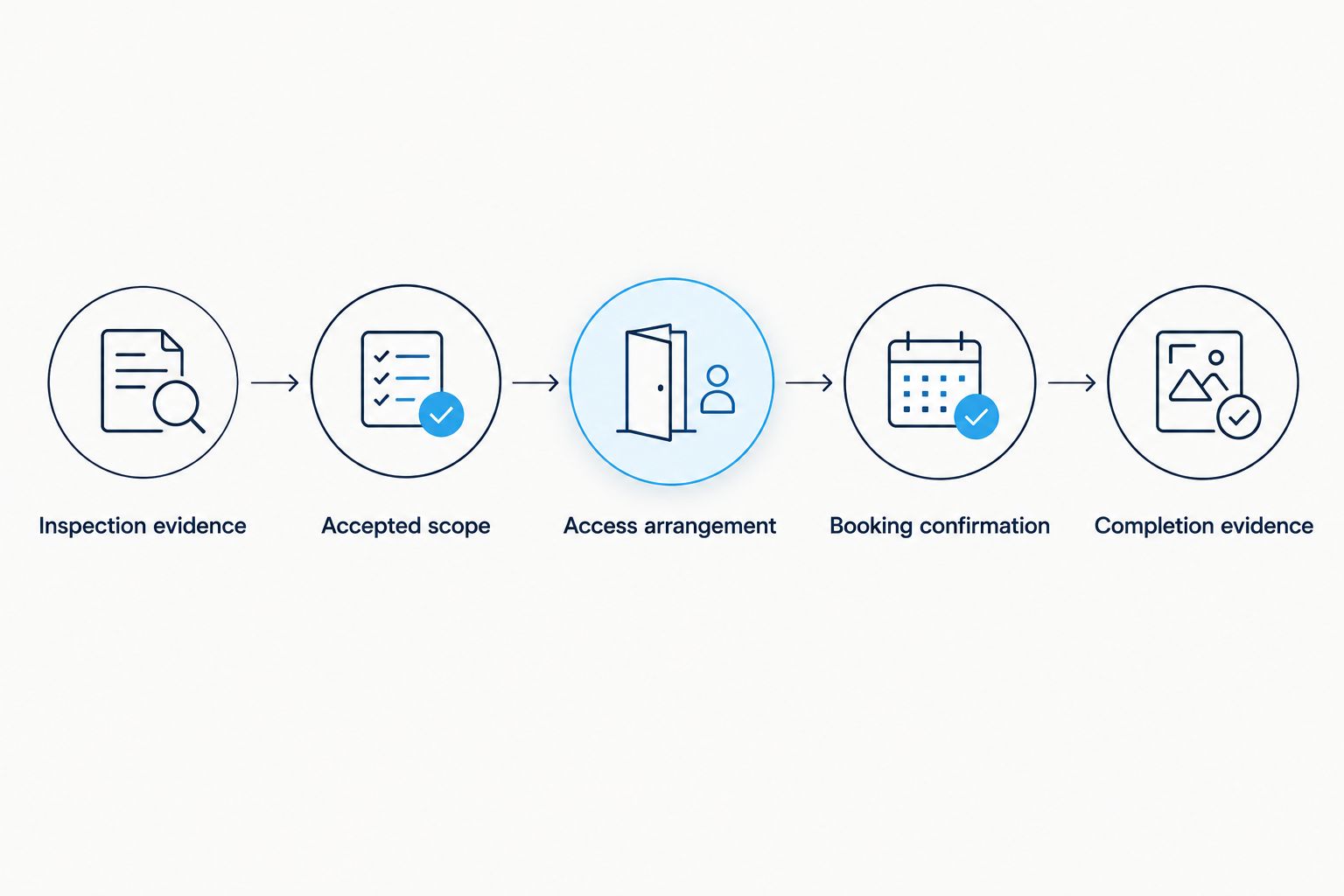
For your 2026 workflow, keep inspection evidence, the cleaning request and the booking confirmation together. The objective is a clear record, not an automatic appointment created from unreviewed feedback.
Before you start
- Inspection evidence and permission: Obtain the property manager’s written cleaning findings and permission to share relevant photographs. If you do not have authorised Inspect Real Estate access, ask the property manager to supply the relevant information.
- Original booking details: Gather the property address, original cleaning date, booking reference, agreed scope and the cleaner’s existing correspondence. Nominate the person authorised to approve the return visit.
- Access after key handover: Confirm who can authorise entry. A tenant’s request does not establish that the cleaner can collect keys or enter after possession has changed.
This guide describes a handover you manage through correspondence and a tracking record. The bold labels below are suggested fields for your own record, not Inspect Real Estate buttons, settings or confirmed integration features.
Inspection evidence record
Capture the findings against the correct property
- Obtain the inspection feedback from the property manager. Retain the original message or document so the cleaner can distinguish the manager’s wording from your summary.
- Create Property address, Original booking reference, Inspection date and Request owner fields in your tracking record. Include the unit number and suburb, not just the street name.
- Add Cleaning findings and Evidence received. Describe each affected room, surface and requested correction; attach only photographs relevant to that work.
- Separate cleaning items from damage, maintenance and disputed findings. Send unclear items back to the property manager for clarification rather than rewriting them as accepted cleaning work.
- Check the property and booking details against the original cleaning correspondence before sending anything to the cleaner.
Expected result: You have 1 request record per property and original clean, with traceable inspection evidence and a named owner.
Keep the description specific. “Kitchen needs attention” leaves the cleaner guessing; “grease remains on the underside of the rangehood” identifies the surface and the issue without deciding who is responsible.
Record evidence without accepting every finding
Copying an inspection finding into your record does not mean you agree with it. Add Clarification required where the photograph, location or requested action is unclear.
Use the bond cleaning checklist for apartments in Australia to organise rooms and surfaces. Compare the findings with your actual booking agreement; a general checklist does not replace the scope you accepted.
Do not circulate the entire tenancy file when a short extract and relevant photographs explain the cleaning issue. Keep unrelated personal information out of the cleaner’s handover.
Return-visit scope and approval
Decide what the cleaner is being asked to do
- Compare Cleaning findings with the original booking scope. Identify whether you are requesting correction of previously agreed work, additional cleaning or clarification.
- Send the findings and relevant photographs through your existing correspondence with the cleaner. Include the original booking reference prominently.
- Ask the cleaner to confirm the proposed work in writing. Do not describe a return visit as covered by an earlier agreement until the cleaner confirms that position.
- Record Accepted scope, Approval owner and Approval status. Keep unresolved findings visible rather than silently removing them.
- Obtain approval from the person responsible for authorising the work before requesting a firm appointment.
Expected result: The cleaner and the authorised customer agree on the requested work, with unresolved items clearly separated.
A re-clean request and a new cleaning request need different treatment. The former asks the original cleaner to address identified issues with earlier work; the latter asks for work that still needs its own agreement.
For a 2026 return-visit request, state which category applies to each item. Do not bundle an oven correction and newly requested window cleaning into an unexplained request to “finish everything”.
Choose the appropriate handover
Use the original booking thread for a defined correction; use a separately approved request for additional work. Both approaches need written acceptance before scheduling.
| Handover option | Best for | Advantage | Limitation |
|---|---|---|---|
| Original-booking re-clean request | Specific cleaning findings linked to the earlier clean | Keeps the original scope and inspection evidence together | Requires the cleaner to confirm which findings the return visit covers |
| Separately approved cleaning request | Additional work outside the accepted return-visit scope | Makes the new instructions explicit | Needs separate approval and must not be mistaken for an agreed correction |
Sparkle bond cleaning provides a service route for residential tenants. It does not remove the need to agree on inspection-related work, access and timing directly with the cleaner.
Access and booking confirmation
Turn the approved request into an appointment
- Add Requested attendance date, Re-inspection deadline and Property time zone to your record. Write dates unambiguously, including the year, rather than using shorthand such as “next Friday”.
- Record Access contact and Access arrangement. Identify who holds the keys, who authorises collection and who must receive notice of the visit.
- Tell the cleaner about access constraints that affect the work, including building entry instructions or any requirement to coordinate with the property manager.
- Request written acceptance of the attendance details. Keep Booking status as Awaiting confirmation until the cleaner accepts them.
- Obtain 2 confirmations: the cleaner’s acceptance of the visit and the authorised access contact’s acceptance of the entry arrangement.
- Send the confirmed details to the tenant and property manager as appropriate. State the agreed cleaning items without implying the property has passed inspection.
Expected result: The appointment has an accepted scope, attendance details and an authorised access arrangement.
For every 2026 booking, include the property’s local time zone in the handover. Do not assume the person coordinating an interstate move is working from the same calendar settings as the property manager.
The confirmation should also identify who receives completion evidence. This avoids a finished visit sitting in the cleaner’s message thread while the property manager waits for an update.
Completion evidence and closure
Finish the request without claiming inspection approval
- Ask the cleaner to provide a completion update against Accepted scope. Request relevant photographs where they help demonstrate the work performed.
- Add Completion evidence and Completion date to the existing record. Keep any unfinished or inaccessible areas visible.
- Send the completion update to the property manager through the agreed correspondence channel. Ask whether any listed cleaning item still needs review.
- Set Booking status to Work completed when the cleaner confirms completion. Use Inspection outcome separately for the property manager’s response.
- Close the request only when the agreed follow-up is resolved. Record any remaining disagreement separately from the cleaner’s attendance history.
Expected result: Your record shows what was requested, what was accepted, what was completed and what the property manager said afterwards.
A completed return visit is evidence of cleaning work, not proof of a bond refund. Keep that boundary clear in your 2026 completion message, especially when the inspection also includes non-cleaning matters.
Update the request when inspection details change
An adjacent workflow applies when the property manager changes the re-inspection date, supplies clearer photographs or revises the cleaning list. Update the existing request rather than opening a duplicate.
- Match the incoming information to the property address and original booking reference.
- Record what changed under Latest revision. Preserve the earlier instruction so the change is understandable.
- Send only the relevant update to the cleaner, with the original request attached or retained in the correspondence thread.
- Seek fresh acceptance if the change affects scope, attendance or access. A previous confirmation does not establish agreement to revised instructions.
- Notify everyone affected once the revised arrangement is accepted.
Expected result: One request remains current, with a readable history of changes and no competing attendance instructions.
The advantage is continuity: everyone can see the latest accepted position. The limitation is that a person must check each update; this manual workflow does not monitor Inspect Real Estate or change bookings automatically.
Troubleshooting
The inspection message does not explain the cleaning problem
Ask for the room, surface, issue and supporting photograph. Keep the request at Clarification required until the cleaner can understand the work without guessing.
Do not treat a broad inspection outcome as an instruction to repeat the entire clean. First establish which items need attention.
The same findings arrive in several messages
Match each message to the existing address and booking reference. Add genuinely new evidence to the same record and acknowledge duplicates without sending another booking request.
Check whether an appointment is already confirmed before contacting the cleaner again. A forwarded reminder is not automatically a new instruction.
The cleaner cannot enter after keys are returned
Contact the authorised property representative to arrange access. Pause confirmation until the key collection and entry arrangement are accepted.
Do not tell the cleaner to enter using an old arrangement that no longer applies. Record the current access contact in the request.
The cleaner disputes an inspection item
Compare the finding with the agreed scope and available evidence. Ask both parties to state the unresolved point clearly, then separate the disputed item from work already accepted.
Keep the status factual. “Scope under review” is more accurate than either “cleaner refused” or “re-clean approved” while agreement remains outstanding.
The visit is complete but the request remains unresolved
Check whether the completion update reached the property manager and whether the evidence addresses each accepted item. Ask for a response against the outstanding cleaning findings.
Do not book another visit merely because the record lacks a reply. Establish what remains unresolved first.
Customise your workflow
Before using the handover for a live return visit, run 3 test cases: a straightforward correction, a duplicate inspection message and a changed access arrangement. Use clearly marked practice records without unnecessary tenant information.
For each case, check that the request owner knows the next action. A useful record makes the waiting party obvious: property manager, tenant, cleaner or access contact.
Add reminders only after you define who responds to them. A reminder should prompt someone to check the request, not silently create an appointment.
If you later commission automation, require a verified connection method and documented permissions before enabling it. Keep human approval between inspection feedback and any booking action, and test duplicate handling before using live records.
Discuss your bond cleaning requirements
Confirm the property details and cleaning scope directly with Sparkle.
FAQ
How do I connect Inspect Real Estate to bond clean re-booking?
Use a controlled handover from inspection feedback to an approved cleaning request. Match the findings to the original booking, confirm the scope and access, then obtain the cleaner’s written acceptance.
Does this guide set up an automatic Inspect Real Estate integration?
No. This guide describes a manual handover and does not establish a native connector, booking synchronisation or automatic monitoring of Inspect Real Estate.
Can I arrange a return clean without Inspect Real Estate access?
You can coordinate a return-clean request using the relevant written findings supplied by the property manager. Obtain permission to share the evidence and keep the original booking reference with the request.
What information should I send to Sparkle for a bond cleaning return-visit request?
Send the property address, original booking reference, specific cleaning findings, relevant photographs and requested timing. Confirm the accepted scope and access arrangement directly before treating the visit as booked.
Should every failed inspection trigger another bond clean?
No. Review the individual findings first and separate cleaning issues from damage, maintenance and disputed items. Request only the cleaning work that has been identified and agreed.
What happens if the property manager changes the inspection date?
Update the existing request and ask the cleaner to accept any revised attendance details. Reconfirm access and notify the affected people once the change is accepted.
Does a completed re-clean mean my bond will be refunded?
No. A completed re-clean records the agreed cleaning work, while the inspection outcome and bond process remain separate. Keep completion evidence and the property manager’s response together.
One last thing
An acknowledgement is not a booking confirmation. A message saying the cleaner has received your photographs does not confirm the work, attendance details or access.
Before you stop following up, check that all of those details have been accepted. That final check is more useful than another automated reminder sent to everyone.
Related guides
- Prepare for a bond re-inspection after a failed clean
- Schedule end-of-lease cleaning around your inspection date
- Arrange bond cleaning after the keys are handed back
SparkleClean's end-of-lease service comes with a 72-hour re-clean guarantee. Get an instant price — no hidden fees, book in under 3 minutes.