
Instead of manually chasing a cleaner about instalments, connect Afterpay to bond clean payment plans through the cleaner’s supported payment process, then match the approved payment to your booking. First confirm that the cleaner accepts Afterpay for your particular job; an Afterpay account alone does not establish a payment arrangement with a cleaning business.
- To connect Afterpay to bond clean payment plans, confirm merchant acceptance before attempting payment.
- Sparkle provides bond cleaning; confirm payment methods directly before choosing a repayment arrangement.
- An Afterpay approval and a confirmed cleaning booking are separate records. Keep both.
- Finalise carpet steam cleaning, oven cleaning and window cleaning requirements before authorising payment.
Why this matters
Your bond clean has a service deadline. Your payment plan has repayment obligations. Treat them as separate commitments, because completing a payment application does not tell you when the cleaner will arrive or what the job includes.
Sparkle bond cleaning is for residential tenants preparing to hand back a rental. Confirm the payment methods for your job directly with Sparkle before planning around Afterpay. Choose the cleaning scope first, then establish how you will pay for that agreed work.
For a 2026 move, build the payment process around the inspection and key-return dates. Do not build the move around an assumed finance approval, an expected bond refund or an unconfirmed cleaning appointment.
This guide covers the tenant-side workflow. You are authorising payment to a participating business, not installing an integration or connecting your rental bond account to Afterpay.
Before you start
- Account access: Have access to your own Afterpay account and the email address or mobile number associated with it. Enter account credentials only through Afterpay’s own authentication process, not in a message to a cleaner.
- Booking materials: Keep the written cleaning scope, property address, proposed service date and booking reference together. Use the bond cleaning checklist for apartments in Australia to identify work you need clarified before payment.
- The gotcha: Confirm that Afterpay applies to the actual payment channel and job you intend to use. Do not assume that a business accepting a payment method in one setting accepts it through every invoice or booking process.
Stop here if acceptance is not confirmed. Ask the cleaner how to pay for this booking and which supported payment route to use. Do not attempt to turn an ordinary invoice into an Afterpay transaction yourself.
Cleaning scope and payment route
Establish the job before the payment
- Send the cleaner your property details, planned move-out date and inspection deadline. Identify access restrictions, remaining furniture and any areas requiring particular attention.
- Ask for a written scope covering the rooms and tasks included. Clarify carpet steam cleaning, oven deep cleaning and window cleaning rather than assuming each task forms part of the same booking.
- Confirm the service date and how the business records a booking as accepted. Ask whether payment authorisation and appointment confirmation happen together or separately.
- Ask whether the business accepts Afterpay for this job and request the supported payment instructions. Keep that answer with the booking correspondence.
Expected result: You have an agreed cleaning scope, a proposed or confirmed appointment, and a payment route identified by the cleaner. You have not authorised an unrelated transaction or relied on a general payment-method claim.
For a 2026 booking, use the instructions supplied for the current job. An old screenshot or a payment method used for a previous move is not confirmation for this transaction.
Choose between supported payment routes
The useful comparison is between an approved Afterpay transaction and another payment method the cleaner actually accepts. Neither route changes the cleaning checklist by itself.
| Payment route | Best for | Advantage | Limitation | Check before proceeding |
|---|---|---|---|---|
| Afterpay through a supported payment process | Tenants choosing repayments they can meet | Separates the purchase from the repayment schedule shown in the agreement | Acceptance and transaction approval are required; repayment obligations remain | Merchant identity, job reference and repayment terms |
| Another payment method accepted by the cleaner | Tenants who prefer not to create an Afterpay repayment obligation | Avoids managing a separate Afterpay schedule | Does not provide an Afterpay payment plan | Payee details, payment instructions and booking confirmation |
Choose the supported route you can manage, not the route you expected to find. For Sparkle bond cleaning, agree on the service requirements before discussing how payment will be authorised. A payment arrangement does not add tasks to the cleaning scope.
Afterpay authorisation
Complete the supported payment process
- Open the payment process supplied by the cleaner through a trusted booking conversation or website journey. Check that the business and transaction relate to your agreed clean.
- Select Afterpay if that option appears in the supported payment process. If it does not appear, stop and ask the cleaner rather than choosing a different business or unrelated transaction.
- Complete Afterpay’s authentication and assessment steps. Read the repayment schedule and terms presented for your transaction before authorising it.
- Check the purchase details against the agreed cleaning job. Resolve an incorrect business name, scope or reference before continuing.
- Authorise the transaction only when you understand the repayment obligations. Save the confirmation and return to the cleaner’s booking process if directed.
Expected result: You have a clear transaction outcome and, if approved, a record of the payment arrangement. You still need the cleaner’s confirmation that the correct booking is recorded.
Button names beyond the Afterpay payment option depend on the payment channel. Follow the live instructions instead of searching for an assumed integration setting. Tenants do not need merchant credentials or developer access for this workflow.
In 2026, review the terms displayed during your actual transaction. Do not use a remembered repayment schedule as a substitute for the agreement you are accepting.
Check affordability before authorising
Read every repayment date against your moving commitments. Include rent, removalists and essential household spending in your own budget; do not treat a displayed payment option as evidence that the repayments fit your circumstances.
Do not rely on your bond refund arriving before a repayment falls due. The cleaning booking, the bond claim and the finance agreement are separate processes. Plan repayments using funds you can account for independently of the bond outcome.
If the schedule does not work for you, stop before authorisation. Ask the cleaner about another accepted payment method without assuming that an alternative instalment arrangement exists.
Booking confirmation and repayment records
Match the payment to the clean
- Check for a transaction confirmation from the payment process. Record the reference and the outcome without sharing account passwords or verification codes.
- Ask the cleaner to confirm that the payment relates to the correct property, service date and cleaning scope. Supply the transaction reference through the established booking conversation if needed.
- Obtain written booking confirmation. Verify access arrangements, the contact person and any preparation instructions before the cleaning date.
- Save 3 records: the cleaning scope, payment confirmation and booking confirmation. Keep them in 1 folder so you can retrieve the right evidence without searching separate conversations.
- Set 2 calendar reminders: one for the cleaning appointment and one for reviewing your repayment schedule. Record individual repayment dates as shown in your agreement.
Expected result: You can identify what was ordered, how payment was authorised and when the cleaner is expected. None of those questions depends on interpreting a single screenshot.
The recommended record set for a 2026 move is deliberately simple. The cleaner needs booking information, while you need payment and repayment information. Keep both organised without sending unnecessary financial details to the cleaning team.
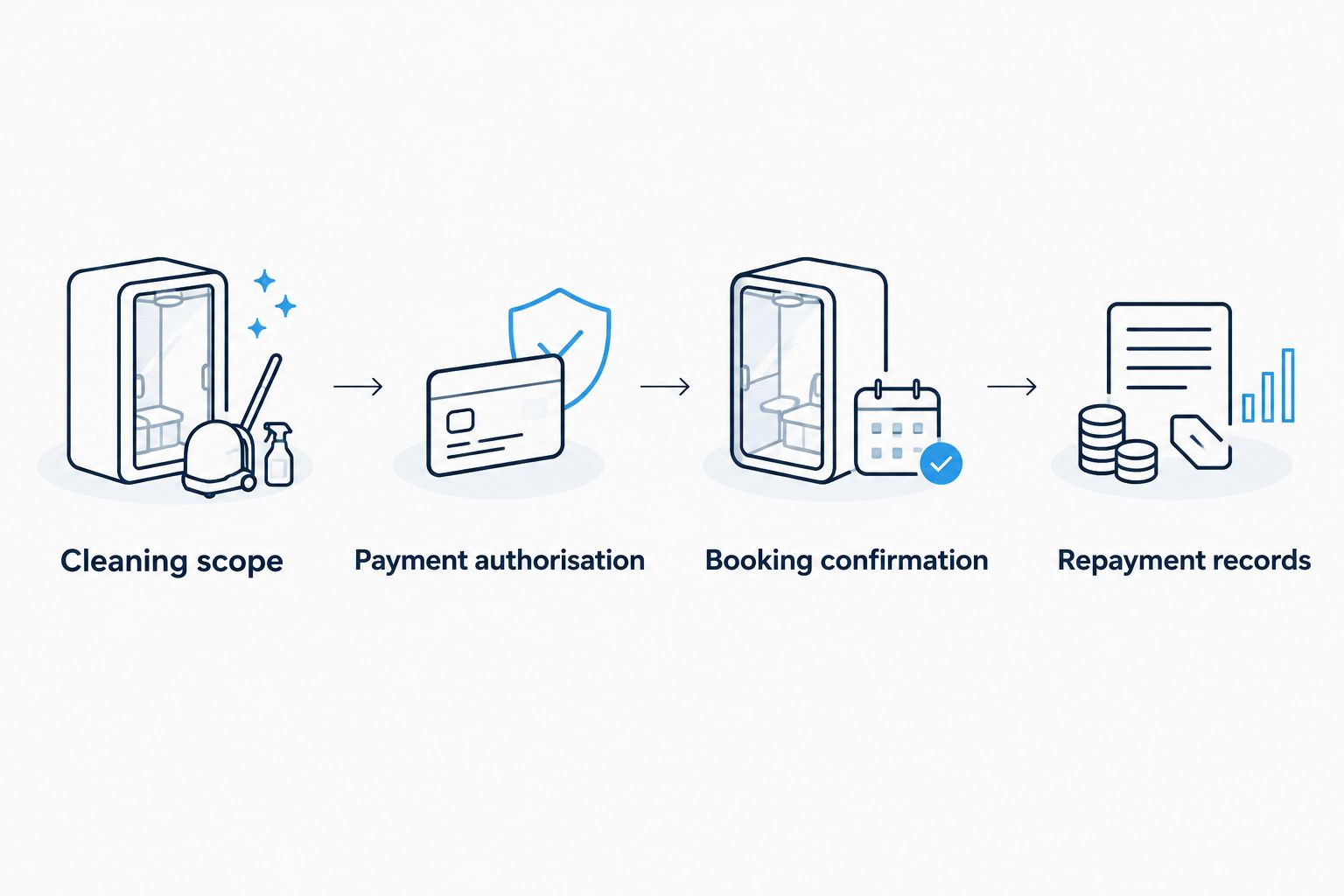
Keep the cleaning invoice or receipt with these records when it is issued. A finance confirmation records a payment arrangement; it does not describe every cleaning task or prove that the work has been completed.
When the booking changes after payment
A move-out date can change after you authorise payment. Handle the service change with the cleaner first, then establish whether anything also needs to change in the payment record.
- Send the cleaner the booking reference and requested change. Specify whether you are changing the date, property access or cleaning scope.
- Ask for written confirmation of the revised service arrangement. Do not assume that a repayment schedule updates the appointment automatically.
- If the transaction needs an adjustment or refund, ask the cleaner to explain the applicable process. Check the resulting status through Afterpay as well.
- Continue following the repayment instructions currently shown in your account unless Afterpay confirms a change. A requested cancellation is not the same as a completed payment adjustment.
Expected result: The revised booking and the payment record agree, or you have identified which party must resolve the remaining issue.
Avoid creating a replacement payment while the original transaction is unresolved. First establish whether the original booking is being amended, cancelled or retained, and obtain a clear transaction outcome.
Troubleshooting
Afterpay is missing from the payment process
Ask the cleaner whether this job and payment channel support Afterpay. Do not assume the missing option is a browser fault. Use the business’s confirmed instructions or choose another method it accepts.
The transaction is declined
Treat a declined transaction as unsuccessful. Review any explanation provided by Afterpay and contact Afterpay about account or assessment questions. Tell the cleaner that payment has not been approved and clarify the booking status before attempting another route.
Payment is approved, but the booking is unconfirmed
Contact the cleaner with the transaction reference and property details. Ask the business to match the payment to the job and confirm the service date in writing. Do not authorise a second payment simply because a confirmation message has not arrived.
The page closes before you see a result
Check the transaction status before retrying. Review your Afterpay account and booking correspondence, then ask the cleaner to check its payment record. Repeating the process without checking creates uncertainty about whether another transaction has been initiated.
A refund request has not changed the repayment schedule
Check the refund status with the cleaner and the payment status with Afterpay. Keep the cancellation or adjustment correspondence. Continue using the repayment instructions shown by Afterpay until the account reflects a confirmed change.
Customise your workflow
Add the practical handover details to the same booking record: furniture removal, key collection, building access and inspection timing. These details affect whether the cleaner can carry out the agreed work, regardless of the payment method.
For a share house, nominate a booking contact and agree privately how housemates will contribute. Do not assume that a cleaning invoice or an Afterpay agreement automatically divides responsibility between tenants.
For Sparkle, confirm the work you need before authorising payment. Carpet steam cleaning, oven deep cleaning and window cleaning are service requirements to discuss, not tasks to infer from the way you pay.
Plan your bond clean
Confirm the cleaning scope, booking arrangements and accepted payment methods for your move.
FAQ
How do I connect Afterpay to bond clean payment plans?
Confirm that the cleaner accepts Afterpay for your job, then use its supported payment process. Review the repayment terms, authorise the transaction and obtain separate confirmation of the cleaning booking.
Does Sparkle accept Afterpay for bond cleaning?
Confirm accepted payment methods directly with Sparkle before planning an Afterpay transaction. Ask specifically about your job and the payment channel you will use.
Do I need an integration app to pay a bond cleaner with Afterpay?
A tenant does not need a merchant integration app to use a supported Afterpay payment process. The cleaning business must provide a supported way to accept the transaction.
Does Afterpay approval confirm my cleaning appointment?
Afterpay approval does not, by itself, establish your cleaning appointment. Obtain the cleaner’s written confirmation of the property, service date and agreed tasks.
Can I use my expected bond refund to cover repayments?
Do not rely on an expected bond refund to meet repayment dates. Plan for the schedule in your payment agreement independently of when your bond claim is resolved.
What happens if I change the cleaning date after paying?
Agree on the revised cleaning date directly with the cleaner. Separately check whether the payment record needs an adjustment; changing an appointment does not establish a revised repayment schedule.
Is an Afterpay confirmation enough evidence for my property manager?
Keep the cleaner’s invoice or receipt as well as the payment confirmation. A finance confirmation does not establish the cleaning scope or show that the work was completed.
One last thing
Check the property address on the booking confirmation, not just the payment reference. A correct payment attached to the wrong job still leaves your move unresolved. Before your 2026 handover, match the address, service date and agreed scope across the records you have saved.
Related guides
- How to get a cleaning receipt for your real estate agent
- How to schedule end-of-lease cleaning around your inspection date
- How to organise end-of-lease cleaning around a removalist
SparkleClean's end-of-lease service comes with a 72-hour re-clean guarantee. Get an instant price — no hidden fees, book in under 3 minutes.