
Instead of manually rechecking listing details and chasing cleaning arrangements, connect realestate.com.au listings to pre-inspection cleaning through a shared job record and an approval checkpoint. Use the listing as a property reference, then confirm the inspection, access and cleaning scope before sending a request to Sparkle.
- Connect realestate.com.au listings to pre-inspection cleaning through an approved job record, not an assumed automatic booking.
- Sparkle suits residential tenants arranging end-of-lease cleaning before their final inspection.
- Confirm the inspection type, property access and cleaning scope before requesting a booking.
- Update the existing cleaning record when inspection details change; do not create duplicate requests.
Why this matters
A public listing and a cleaning instruction serve different purposes. The listing identifies the advertised property; your cleaning record must establish who authorised the work, when access is permitted and what needs cleaning.
For your 2026 setup, keep those sources separate. A published open-home time is not permission to enter an occupied home, and it does not establish a tenant's final bond inspection date.
Sparkle end-of-lease cleaning is best for residential tenants preparing their rental for a final inspection. This workflow organises the handover to a cleaning provider; it does not treat Sparkle as a listing integration platform.
The benefit is a clear chain from property reference to confirmed cleaning request. The trade-off is deliberate: someone must approve the job before it becomes a booking.
Before you start
- Property information and permission: Have the realestate.com.au listing reference, the complete address and written confirmation from the person authorised to arrange access. You do not need publishing access for the manual-reference workflow described here.
- A shared record and an owner: Use a spreadsheet or task system you can edit, plus a calendar and a contact method for the cleaning provider. Assign one person to maintain each property's record and communicate changes.
- The inspection distinction: Confirm whether you mean an advertised open home, a routine rental inspection or a final bond inspection. These are different events. Do not copy an advertised inspection time into the final-inspection field without confirmation.
This 2026 guide uses fields you create yourself. Bold field names below belong to your own record, not to realestate.com.au menus, and the process does not depend on a particular connector, account tier or booking interface.
Property record configuration
Build the record before contacting a cleaner. Keep 1 property record for each cleaning job so that listing changes, access instructions and booking confirmation stay together.
- Create fields named Property address, Listing reference, Inspection type, Inspection date, Time zone, Access contact, Cleaning scope, Job owner and Status. Keep the unit number separate if it helps distinguish apartments in the same building.
- Copy the listing reference into Listing reference. Check the street address and unit number against information supplied by the tenant or property manager; do not rely on photographs to identify the property.
- Set Inspection type to the event you are actually preparing for. Record the confirmed date and time, or leave the date unconfirmed rather than inserting an estimate.
- Enter the name of the person responsible for the job in Job owner. Set Status to Needs confirmation until that person has checked the inspection and access details.
Expected result: You can identify the property, the inspection event and the person responsible without opening a message thread.
Keep personal information out of broadly shared notes. Store key codes and detailed entry instructions in a restricted place, then share them only with the people who need access.
Cleaning scope configuration
A listing is a reference, not a cleaning checklist. Build the scope from the property's current condition and the tenant's handover requirements, then get the provider's agreement before treating any task as included.
- Add fields named Furniture status, Carpet requirements, Oven requirements, Window requirements, Known issues and Scope approval. Describe the rooms and surfaces requiring attention in Cleaning scope.
- Confirm whether the property will be empty when cleaning starts. Record remaining furniture, stored belongings or removalist activity that affects access to floors and cupboards.
- Identify carpet steam cleaning, oven deep cleaning and window cleaning separately. Sparkle provides these services, but the job record must still specify which work you are requesting.
- Describe stains, heavy grease, pet hair or inaccessible areas accurately. Separate cleaning requests from damage and maintenance issues; do not ask a cleaner to accept an undefined instruction such as making everything inspection-ready.
- Ask the responsible tenant or authorised contact to approve the scope. Record their confirmation in Scope approval, including any areas excluded from the request.
Expected result: The cleaning provider receives a defined request rather than a listing link and an assumed scope.
For your 2026 checklist, keep requested work and accepted work in separate fields. A request for carpet steam cleaning does not become part of the agreed job until the provider confirms it.
Schedule and approval configuration
Work backwards from the confirmed inspection, not from an assumed cleaning duration. Use 2 approval checkpoints: approval to request the work, followed by the provider's confirmation of the arrangement.
- Create Cleaning start, Cleaning finish, Access approved, Provider confirmation and Booking reference fields. Enter the proposed cleaning window only after checking when the property will be accessible.
- Allow for the actual sequence of work. Confirm removalist completion, any other trades, carpet drying requirements and the time needed to check the result with the people carrying out those tasks.
- Check that the cleaning finish precedes the inspection and leaves time for a walkthrough. Use the provider's expected duration rather than applying a fixed allowance to every property.
- Obtain permission to send the cleaning request. Set Status to Request approved, then send the address, agreed scope, proposed timing and access contact to the provider.
- Record the provider's response in Provider confirmation. Set Status to Confirmed only after the provider accepts the arrangement; retain the confirmation or booking reference with the record.
Expected result: You have a confirmed cleaning arrangement tied to a verified inspection, rather than an unaccepted calendar entry.
Read the guide to scheduling end-of-lease cleaning around your inspection date when deciding how to sequence the work. Confirm the practical timing for your property instead of treating a general guide as a booking commitment.
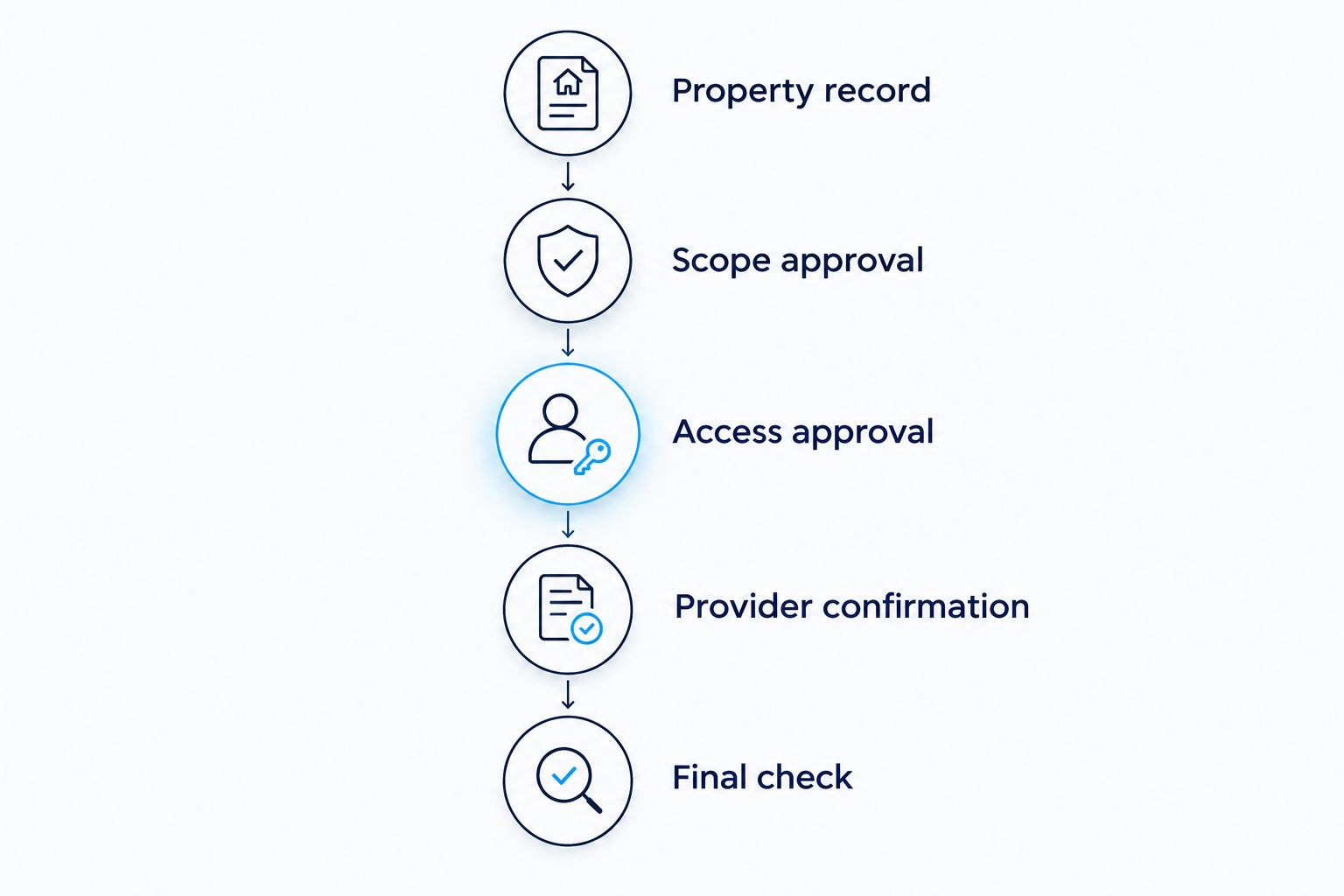
The approval sequence is simple: Property record, Scope approval, Access approval, Provider confirmation, Final check. Keep these stages visible so an incomplete request cannot look like a confirmed booking.
Completion and testing configuration
Test the handover before using the process for a live inspection. Your 2026 trial should cover 3 test cases: a new request, a changed inspection and a cancelled event.
- Create a clearly labelled test record without sending a real cleaning request. Check that an unconfirmed inspection date keeps Status at Needs confirmation.
- Change the inspection time in the test record. Confirm that the job owner sees the change and must recheck the cleaning window, access permission and provider arrangement.
- Mark the test inspection as cancelled. Confirm that the record remains visible for follow-up rather than disappearing before someone checks whether the cleaning is still required.
- For a completed live job, add Completion notes, Outstanding items and Final check. Record what was checked and any areas requiring follow-up without assuming completion means inspection acceptance.
- Keep relevant cleaning confirmation, correspondence and permitted condition photos together. Restrict access to the people handling the tenancy and cleaning arrangement.
Expected result: The process handles changes and cancellations as well as new jobs, with a visible record of unresolved work.
A cleaning request is not a confirmed booking, and a completed clean is not an inspection result. Give each event its own status so the next action remains clear.
Update cleaning whenever inspection details change
The adjacent workflow is change handling. Keep the existing property record and revise it when an authorised contact confirms a new inspection date, access arrangement or scope.
Choose the workflow according to the event, not the appearance of the listing:
| Workflow | Best for | Benefit | Limitation |
|---|---|---|---|
| New cleaning request | A confirmed inspection requiring an initial clean | Establishes the scope, access and provider arrangement together | Requires approval before sending the request |
| Existing booking update | A changed inspection date or access window | Keeps the history attached to the same job | Requires the provider to accept the revised arrangement |
| Open-home preparation | An authorised request to prepare a property for viewing | Separates presentation work from tenancy handover | Does not replace a final bond-cleaning scope |
When something changes, record the old detail, the replacement detail and who confirmed it. Set Status to Change awaiting confirmation, then contact the provider before editing the arrangement to appear settled.
For a cancelled inspection, ask whether the clean is still needed. A tenant leaving the property can still need end-of-lease cleaning even when a viewing is cancelled; an unchanged listing does not settle that question.
In your 2026 process, the authorised contact's confirmed instructions determine the cleaning request. The public listing remains a reference, not an instruction source.
Troubleshooting
The property has received duplicate cleaning requests
Fix: Search the existing records by full address and job reference before sending another request. Keep the active record, mark the duplicate clearly and contact the provider to resolve any duplicated instructions.
Do not assume deleting your duplicate calendar entry cancels a request already sent to a cleaner.
The inspection time and cleaning time no longer fit
Fix: Reconfirm the inspection time, local time zone and access window with the authorised contact. Ask the provider to confirm a revised arrangement before changing Status back to Confirmed.
Record the full date and local time rather than shorthand such as tomorrow morning, especially when coordinating from interstate.
The cleaner cannot enter the property
Fix: Check who holds the keys, who authorised entry and whether building access needs separate arrangements. Reconfirm the handover directly rather than forwarding an old access message.
Keep Access approved incomplete until the person controlling entry confirms the arrangement.
The requested work differs from the accepted scope
Fix: Compare Cleaning scope with Provider confirmation. Resolve missing tasks before work starts, particularly carpet steam cleaning, oven deep cleaning and windows.
Send any additions as an explicit scope change. A note added to your private record does not notify the provider.
The listing changes but the job owner misses it
Fix: Make the authorised contact responsible for confirming relevant changes directly. Recheck the inspection and access details before the cleaning appointment; do not make listing monitoring the only safeguard.
The record should show who confirmed the latest information and when, so an old listing detail cannot silently overwrite an agreed instruction.
Customise your workflow
Start with the shared record and a clear approval owner. Add reminders only after the basic handover works; a reminder can prompt a check, but it cannot approve access or confirm that a provider accepted the job.
For multiple properties, separate the property identity from the individual cleaning job. Keep a distinct job reference for each tenancy handover so a future listing does not reopen a completed request.
With Sparkle end-of-lease cleaning, keep the booking conversation focused on the tenant's actual requirements: property condition, requested services, inspection timing and authorised access. The strength is a clear service request; the limitation is that your record still needs a person to confirm changes.
FAQ
How do I connect realestate.com.au listings to pre-inspection cleaning?
Create a shared cleaning record using the listing as a property reference, then confirm the inspection, access and scope before requesting a booking. Record the provider's acceptance separately from the request.
Does this workflow require a realestate.com.au integration?
No. This workflow uses a manually maintained property reference and approval record, so it does not depend on a native connector or automated booking feature.
Can I use an advertised open-home time as my bond inspection date?
No. Confirm the final bond inspection date with your property manager or authorised contact. An advertised viewing and a tenancy handover are different events.
What information should I send to the cleaning provider?
Send the complete property address, requested scope, proposed cleaning window and authorised access contact. Include relevant condition details and ask the provider to confirm the arrangement.
What happens if the inspection date changes after I request cleaning?
Update the existing job record and ask the provider to confirm any revised timing. Do not create a replacement booking without resolving the original request.
Is carpet steam cleaning automatically part of the request?
No. List carpet steam cleaning explicitly and check that the provider's confirmation includes it. Apply the same check to oven deep cleaning and window cleaning.
Can a confirmed cleaning booking guarantee my bond refund?
No. A cleaning booking confirms an arrangement for work, not the outcome of a tenancy inspection or bond decision. Keep the agreed scope and completion evidence with your tenancy records.
One last thing
The most useful trigger is approval, not publication. A listing can help identify a property, but only confirmed instructions establish when cleaning should happen and who can authorise entry.
Make approval the point where the job moves from planning to action. That single distinction keeps a useful reminder from becoming an unauthorised cleaning request.
Related guides
- Bond cleaning checklist for apartments in Australia
- How to organise end-of-lease cleaning around a removalist
- How to get a cleaning receipt for your real estate agent
SparkleClean's end-of-lease service comes with a 72-hour re-clean guarantee. Get an instant price — no hidden fees, book in under 3 minutes.